
 Shopping Cart Home - Start Here
 Remote Controls for Radio Equipped Motors
 DIY Starter Kits for Window Shades
 DIY Starter Kits for Window Openers
 ZWAVE Blind & Shade Controllers
 How To Choose the Right Blind & Shade Motor
 Select tubular Motor (Comparison table)
 Choose RollerTrol Battery & Solar Motors
 DIY Roller Blind Motors - FAQ
 How To Insert Blind Motors & Attach Brackets
 Calculate your Blind or Shade fabric Weight
 Select Tube Size for Blind Motor
 How to Insert Blind Motors Into Tube
 How to Insert Blind Motors Into Tube with Adapters
 Attach Mounting Brackets - Standard + Mini Series
 Attach Mounting Brackets - MAXI Blind Series
 How To Set Up Radio Equipped Blind & Shade Motors
 Series P Radio Remote Control Motors
 Series G Radio Remote Control Motors
 Series R Radio Remote Control Motors
 BroadLink RF/IR Hub System for Motors
 How To Set Up Window/Skylight Openers
 Introduction: Window & Skylight (K Series)
 BroadLink RF/IR Hub System for Motors
 Z-Wave Interfacing for Shade & Opener Motors
 Wired Wall Switch Control of Window Openers
 How To Use Alexa With Our Motors & Window Openers
 How To Use BroadLink Phone App Hub With Our Motors
 How To Set Up ShadeSlider Skylight or Bottom-Up Blind
 How To Retrofit RV, Boat and Motorhome Blinds
 How To Set Up Non-Radio Motors
 Operation & Travel Limits of Non-Radio Motors
 Make a Simple DC Motor Reversing Switch
 How To Set Up ZWAVE Control
 ZWAVE Controller for G Series Radio motors
 ZWAVE Door/Window Opening Detection
 ZWAVE Motion Detector with Temperature Sensing
 Motorized Window Blinds & Shades
 Motorized Dual Window Shade
 Make Motorized Blackout Blinds
 Phone-Tablet-PC Control for Motorized Blinds
 Mini Motor for Existing Shade Retrofit
 Roman Shade Retrofit
 Make a Motorized Window Opener
 Blind & Shade Motors for RV & Boats
 Make Your Own Projector Screen
 Curtain Closer: Ultimate Home Theater
 Wireless Battery Operated Drapery Motor Kit
 Make a Motorized Bottom-Up Shade
 Make a Motorized Skylight Opener
 BroadLink RF/IR Hub System for Motors
 Why Buy From US?
 Background & Mission Statement
 Customer DIY Testimonials
 Site Map - Search All Pages
 Why Buy From US?
 RollerTrol Users Forum
 Contact Page
Part 1: Introduction to Vera (by Adrian Biffen, GM, Feb 2012)
Please Note: This article series was written in 2012 and is here for legacy purposes only; our current focus is on the very affordable BroadLink® hub that can learn RF and IR codes, giving direct control over each blind motor, skylight/window opener, and other devices. It does not require any external interfaces.
We have 2 distinct approaches to blind and shade control:
-
Our radio equipped motors use RF (Radio Frequency) for transmission of the remote control signal from a hand-held or wall mounted remote control. These very affordable multi-channel systems are extremely easy to install and operate. Our new built-in rechargeable battery motors require no wires at all!
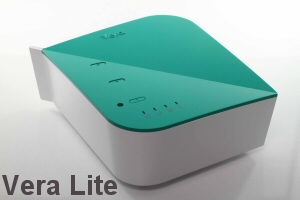
With the RFXCOM™ transmiter plug-in for Vera™, you can later extend control of your window blind radio motors to your web enabled devices (PC, phone, tablet, etc). VeraLite at $199 is the bargain of the year when it comes to full blown home automation systems - and the most user-friendly.
- Our non-radio motors require an external controller and are most often used with home automation systems, using our Universal Interface. These systems are complex wired systems, more expensive and require some technical know how.
Here's what one of our customers had to say:
"I got both motors up and running within a few minutes and the RFXCOM setup and running with my Vera 2 today. Works great and very simple to setup and work with. Thanks so much for the help and support - your guidance and your great products have filled the last gap for me in terms of home automation at a fair price."
- DB, San Francisco, California, USA
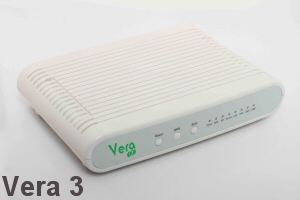 In order to further support and extend our radio motors, we deliberated and studied the market for a number of years before we chose Vera as our premium home automation controller, and there is a long list of reasons why we think it is the very best choice for complete home automation.
Vera and VeraLite are powerful home automation controllers that run as a web server on your local lan and/or wifi network. They can be used simply as local controllers, but they can also be accessed remotely from any location via browser using a secure encrypted system.
You can easily monitor and control your home whether you are on the premises or away, and look after the boat down at the dock, that summer cottage at the lake, or that ski chalet in the mountains. You can have the system send email alerts, based on events that you structure yourself with very easy to use wizards.
Unlike many PC based systems, you do not need a dedicated 'always on' computer or laptop, but you can use our USB transceiver with other systems like Raspberry Pi, Homeseer, Indigo (Mac) or Event Ghost, if you prefer.
The Vera system is about choice, budget & flexibility: it can be operated by any web enabled device via the browser (smartphones, tablets, laptops, desktops) and any operating system (Windows®, Apple®, Linux®, B2G, Android®, Tizen®, IOS®, etc). It can also control various different device protocols, such as Z-Wave®, Insteon®, and x10®. It can be customized to support any device with the Lua scripting language, although the built-in user-friendly interface can set up 'scenes' to do almost anything.
Vera vs Veralite comparison table:
| Feature | Vera Lite | Vera 3 |
| CPU | 500 MHz MIPS | 500 MHz MIPS |
| Flash NAND | 32 MB | 32 MB |
| RAM | 64 MB DDR2 | 128 MB DDR2 |
| USB Ports | 1 USB 2.0 | 2 USB 2.0 |
| WAN Ports | - | 1 |
| LAN Ports | 1 | 4 |
| Z-Wave | Built-in with internal antenna | Built-in with internal antenna |
| Wi-Fi | - | IEEE 802.11b/g/n |
| UI Version | UI5 | UI5 |
| Dimensions (HxWxD) | 116mm x 95mm x 44mm | 177mm x 130mm x 34mm |
| Battery Pack | 4 AA batteries (included) | External, Rechargeable |
purchase Vera controllers in our online store
Note that the primary difference between VeraLite and Vera is that VeraLite does not have wifi built in - it plugs into an existing wifi router. Vera has its own built-in wifi system for those that do not already have a router, but they both have the same functionality. Vera also has twice as much memory (for very large installations, over 60 devices) and some extra ports.
PLEASE NOTE:
The Vera User Interface (UI) has now advanced from UI5 to UI7, and instructions in this article series are for the older UI5 version. We will soon be updating these instructions, and in the meantime, if you have UI7 (green theme) please install the new version of the RFXCOM transceiver plugin. Here is the forum discussion area, and don't hesitate to ask questions there if you need to; these folks are very helpful:
RFXCOM USB transceiver plugin for RollerTrol shades and blind motors
Please have a look at lolodomo's instructions; he is an expert developer, and as he mentions, you have to download and install the ZIP archive here:RFXCOM USB transceiver plugin download page for RollerTrol blinds and shade motors
There are also additional instructions in this post on the Vera forum:
RollerTrol™ blind and shade motor discussion: Vera UI 7
Articles in this series:
Part 1: Vera and VeraLite introduction: web enabled controllers for blinds & shades
Part 2: How to prepare Veralite™ for use with our RollerTrol™ blind motors
Part 3: How to add Rollertrol™ shade and blind control to Veralite & using the USB transceiver
We sincerely hope you enjoy using these advanced motor systems; if you have any questions, please feel free to contact us at any time!