 Shopping Cart Home - Start Here
 Remote Controls for Radio Equipped Motors
 DIY Starter Kits for Window Shades
 DIY Starter Kits for Window Openers
 ZWAVE Blind & Shade Controllers
 How To Choose the Right Blind & Shade Motor
 Select tubular Motor (Comparison table)
 Choose RollerTrol Battery & Solar Motors
 DIY Roller Blind Motors - FAQ
 How To Insert Blind Motors & Attach Brackets
 Calculate your Blind or Shade fabric Weight
 Select Tube Size for Blind Motor
 How to Insert Blind Motors Into Tube
 How to Insert Blind Motors Into Tube with Adapters
 Attach Mounting Brackets - Standard + Mini Series
 Attach Mounting Brackets - MAXI Blind Series
 How To Set Up Radio Equipped Blind & Shade Motors
 Series P Radio Remote Control Motors
 Series G Radio Remote Control Motors
 Series R Radio Remote Control Motors
 BroadLink RF/IR Hub System for Motors
 How To Set Up Window/Skylight Openers
 Introduction: Window & Skylight (K Series)
 BroadLink RF/IR Hub System for Motors
 Z-Wave Interfacing for Shade & Opener Motors
 Wired Wall Switch Control of Window Openers
 How To Use Alexa With Our Motors & Window Openers
 How To Use BroadLink Phone App Hub With Our Motors
 How To Set Up ShadeSlider Skylight or Bottom-Up Blind
 How To Retrofit RV, Boat and Motorhome Blinds
 How To Set Up Non-Radio Motors
 Operation & Travel Limits of Non-Radio Motors
 Make a Simple DC Motor Reversing Switch
 How To Set Up ZWAVE Control
 ZWAVE Controller for G Series Radio motors
 ZWAVE Door/Window Opening Detection
 ZWAVE Motion Detector with Temperature Sensing
 Motorized Window Blinds & Shades
 Motorized Dual Window Shade
 Make Motorized Blackout Blinds
 Phone-Tablet-PC Control for Motorized Blinds
 Mini Motor for Existing Shade Retrofit
 Roman Shade Retrofit
 Make a Motorized Window Opener
 Blind & Shade Motors for RV & Boats
 Make Your Own Projector Screen
 Curtain Closer: Ultimate Home Theater
 Wireless Battery Operated Drapery Motor Kit
 Make a Motorized Bottom-Up Shade
 Make a Motorized Skylight Opener
 BroadLink RF/IR Hub System for Motors
 Why Buy From US?
 Background & Mission Statement
 Customer DIY Testimonials
 Site Map - Search All Pages
 Why Buy From US?
 RollerTrol Users Forum
 Contact Page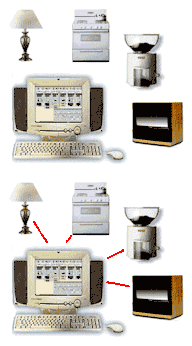
FAQ: What is x10?
X10 is a communications protocol that is used to create the 'smart home'. It allows compatible products to talk to each other by wireless transmissions and the existing 110V electrical wiring in the home. A major benefit is that costly rewiring of your home is unnecessary because you just plug in control modules wherever you need them.
Up to 256 different addresses are available and each device you use usually requires a unique address, but if you want more than one device to respond to the same signal, simply set them to the same address.
In its simplest form, you have 3 elements:
- a wireless RF (radio) remote control unit
- an RF (radio) remote control receiver plugged into an AC outlet that receives the signals from the remote control and transmits the control signals over the AC house wiring
- a control module plugged into an AC outlet that switches motors, appliances and other devices on and off. Dimmer modules are also used for incandescent lighting.
You can start with a very simple system and expand it as desired. You can add PC software at any time to further enhance capabilities with timers, sensors, etc. See our
x10 Starter Kit for Blind and Shade Motors or our x10 Starter Kit for Irrigation and Watering
x10 can be used to control anything you can think of: motorized blinds and shades, irrigation, lighting, heating, security,appliances, etc. You are limited only by your imagination.
We sincerely hope you enjoy using these advanced systems; if you have any questions, please feel free to contact us at any time!