
 Shopping Cart Home - Start Here
 Remote Controls for Radio Equipped Motors
 DIY Starter Kits for Window Shades
 DIY Starter Kits for Window Openers
 ZWAVE Blind & Shade Controllers
 How To Choose the Right Blind & Shade Motor
 Select tubular Motor (Comparison table)
 Choose RollerTrol Battery & Solar Motors
 DIY Roller Blind Motors - FAQ
 How To Insert Blind Motors & Attach Brackets
 Calculate your Blind or Shade fabric Weight
 Select Tube Size for Blind Motor
 How to Insert Blind Motors Into Tube
 How to Insert Blind Motors Into Tube with Adapters
 Attach Mounting Brackets - Standard + Mini Series
 Attach Mounting Brackets - MAXI Blind Series
 How To Set Up Radio Equipped Blind & Shade Motors
 Series P Radio Remote Control Motors
 Series G Radio Remote Control Motors
 Series R Radio Remote Control Motors
 BroadLink RF/IR Hub System for Motors
 How To Set Up Window/Skylight Openers
 Introduction: Window & Skylight (K Series)
 BroadLink RF/IR Hub System for Motors
 Z-Wave Interfacing for Shade & Opener Motors
 Wired Wall Switch Control of Window Openers
 How To Use Alexa With Our Motors & Window Openers
 How To Use BroadLink Phone App Hub With Our Motors
 How To Set Up ShadeSlider Skylight or Bottom-Up Blind
 How To Retrofit RV, Boat and Motorhome Blinds
 How To Set Up Non-Radio Motors
 Operation & Travel Limits of Non-Radio Motors
 Make a Simple DC Motor Reversing Switch
 How To Set Up ZWAVE Control
 ZWAVE Controller for G Series Radio motors
 ZWAVE Door/Window Opening Detection
 ZWAVE Motion Detector with Temperature Sensing
 Motorized Window Blinds & Shades
 Motorized Dual Window Shade
 Make Motorized Blackout Blinds
 Phone-Tablet-PC Control for Motorized Blinds
 Mini Motor for Existing Shade Retrofit
 Roman Shade Retrofit
 Make a Motorized Window Opener
 Blind & Shade Motors for RV & Boats
 Make Your Own Projector Screen
 Curtain Closer: Ultimate Home Theater
 Wireless Battery Operated Drapery Motor Kit
 Make a Motorized Bottom-Up Shade
 Make a Motorized Skylight Opener
 BroadLink RF/IR Hub System for Motors
 Why Buy From US?
 Background & Mission Statement
 Customer DIY Testimonials
 Site Map - Search All Pages
 Why Buy From US?
 RollerTrol Users Forum
 Contact Page
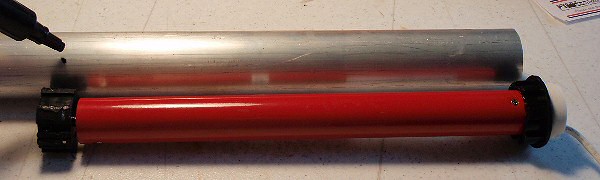
Tubular Motor Insertion Into Tube:The picture below shows the tubular motor prior to insertion inside 6061 aluminum tubing, but you can use steel (1.5" EMT at Home Depot works well) or plastic ABS/PVC. Note the marking of the position of the drive shaft adapter with the grease pen. This is where you would drill a hole if you want to insert a locking screw. The crown adapter is visible on the right hand side (black) and you can see how far it fits into the end of the tube, leaving only the end flange visible. |
|
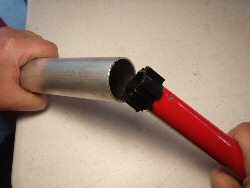 Motor Insertion: inserting motor into tube |
To assemble the unit, slide the motor into one end of the tube; use your fingers to compress the tines on the drive adapter so that it can slide in; you will need to exert some pressure to slide it in. One trick we learned is to wet the rubber drive adapter with isopropyl alcohol; this will make it easier to slide in, and it will evaporate quickly, making a nice tight fit. You may need to file some rubber off if the tube is smaller, or add some duct tape if it is bigger.
PLEASE NOTE: You may want to add a locking screw to make sure there is no slippage. Prior to insertion, drill a hole through the tube, insert the motor, then drill a pilot hole into the adapter inside and insert a locking screw. You can make the hole in the tube as big as the screw head so that it ends up being flush with the tube surface, so it doesn't disrupt the fabric. You could also use a tapered head type of screw and countersink the hole to make it flush. Try and make it so that the screw penetrates the larger part of the notched structure of the drive adapter, so that it has some material around it to hold on to. You could also apply some thread locking adhesive to ensure that the screw will not work its way out over time. A self-tapping metal screw works well as a locking screw, and it does not have to be very big. Note that it should not be very long, or it will hit the metal drive shaft after passing through the drive adapter. Also, the rubber drive adapters have a metal plate embedded in the rubber, and you could hit that too. About 1/4" (6 mm) of penetration should do it. |
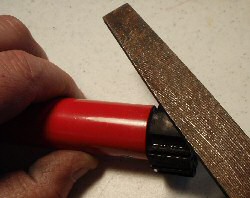 Motor Insertion: trimming the drive adapter |
Depending on the type of tubing you use, the adapter may be slightly on the large size. In this case, use a flat file to gently remove some of the rubber material in order to reduce the diameter (left), until you can push it in. Be careful not to use a bench grinder, or other power tool that can remove a lot of material very quickly - you may remove too much. You want it as tight as possible, while still being able to push it in by hand. If the selected tubing has a larger inside diameter than the motor drive adapter, wrap some tape around the drive roller to build up the diameter of the drive shaft adapter. Heavy duty duct tape is a good choice. Don't put too much on, just enough to take up the slack when you slide it in. If you put too much on, it will make it too tight, and may push the tape off the drive adapter. Use tape to build up the diameter of the crown adapter so that it also has a snug fit. |
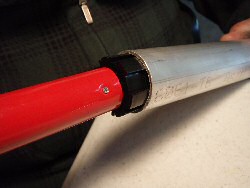 Motor Insertion: compressing the drive adapter |
When you slide the motor housing in, push it all the way until the lip of the crown adapter flange is flush with the end of the tube. Keep in mind that if this is one of our radio equipped tubular motors, there will be a short length of heat shrink tubing on the wiring as it comes out of the motor. The heat shrink sheath covers the radio antenna wire, which should be arranged so that it is not touching any other metal piece, or you will diminish the range considerably. Under normal conditions, these receivers have a considerable range, and are capable of receiving commands from our multi-channel remotes from anywhere inside a typical home. Unlike IR (infrared) remotes, the RF signal also passes through walls without any difficulty, and the remote does not have to be pointed at the motor. |
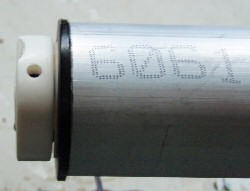 Completed Motor Insertion: showing end cap, crown roller flange & program setting hole |
Also, note the 'settings' hole in the picture (left), at the top of the motor end cap. The motor assembly needs to be mounted so that the hole is accessible. You can also see the crown adapter flange (black) that is left exposed after the motor has been fully inserted into the tube. If this is one of our radio-equipped motors, when you press the button inside the hole with a small screwdriver, it triggers the 'handshake' electronics that allow you to assign this motor to a particular motor on one of our multi-channel remote controls. The travel limits on the radio equipped motors are set entirely by the remote control, so you do not have to touch the motor for that purpose. If this is one of our non-radio motors, the button inside the hole is used to set the travel limits. |
3. Mounting The Roller Assembly:
To complete the assembly, push the end adapter (idler) into the other end of the tube. At this point your assembly is complete and you are ready to mount the unit into the window frame (or wherever you are going to use it).
Use ordinary screws (or fasteners of choice) to mount the assembly with a hanger bracket at each end. Note that they are not the same: there is a tab on one of the brackets that slides into a slot on the motor end cap to stop it from rotating.
You can use double sided tape with a few wraps on it to fasten your material to the roller (such as 3M™ VHB™ RP Tape).
4. Connecting The Wiring:
The next step is to connect the 2 wires from the motor to the power supply (or battery and AC charger). Be sure to check your wiring and make sure there are no short circuit conditions where the 2 wires are able to contact each other. You may need some help from someone that is familiar with splicing wires to do this. DC voltages at this level are not harmful to children or adults, but it is possible to cause fires if you have a short circuit condition. A fused circuit to protect against shorts is always a good idea.
Note that if you are using our battery system, you can set this up in two different ways: with or without the charger. If you conceal the battery up in the valance somewhere, you could just plug the charger in occasionally to recharge the battery. If you want to have it functioning constantly, you'll need to run wiring from your AC outlet (where the charger is plugged in) up to the battery.
The battery does not have to be up where the blind is, it can be concealed lower down if you extend the wiring, although it is better to have the shortest length possible. Standard lamp cord is a good choice for any wiring that you install. Also, try to avoid a really long run from the blind to the AC outlet.
After the assembly has been mounted in the window frame, you are ready to attach the wiring and activate the circuit to set the travel limits (and assign channels if it is radio equipped).
Here is where you will find further instructions for that part:
We sincerely hope you enjoy using these advanced motors; if you have any questions, please feel free to contact us at any time!