 Shopping Cart Home - Start Here
 Remote Controls for Radio Equipped Motors
 DIY Starter Kits for Window Shades
 DIY Starter Kits for Window Openers
 ZWAVE Blind & Shade Controllers
 How To Choose the Right Blind & Shade Motor
 Select tubular Motor (Comparison table)
 Choose RollerTrol Battery & Solar Motors
 DIY Roller Blind Motors - FAQ
 How To Insert Blind Motors & Attach Brackets
 Calculate your Blind or Shade fabric Weight
 Select Tube Size for Blind Motor
 How to Insert Blind Motors Into Tube
 How to Insert Blind Motors Into Tube with Adapters
 Attach Mounting Brackets - Standard + Mini Series
 Attach Mounting Brackets - MAXI Blind Series
 How To Set Up Radio Equipped Blind & Shade Motors
 Series P Radio Remote Control Motors
 Series G Radio Remote Control Motors
 Series R Radio Remote Control Motors
 BroadLink RF/IR Hub System for Motors
 How To Set Up Window/Skylight Openers
 Introduction: Window & Skylight (K Series)
 BroadLink RF/IR Hub System for Motors
 Z-Wave Interfacing for Shade & Opener Motors
 Wired Wall Switch Control of Window Openers
 How To Use Alexa With Our Motors & Window Openers
 How To Use BroadLink Phone App Hub With Our Motors
 How To Set Up ShadeSlider Skylight or Bottom-Up Blind
 How To Retrofit RV, Boat and Motorhome Blinds
 How To Set Up Non-Radio Motors
 Operation & Travel Limits of Non-Radio Motors
 Make a Simple DC Motor Reversing Switch
 How To Set Up ZWAVE Control
 ZWAVE Controller for G Series Radio motors
 ZWAVE Door/Window Opening Detection
 ZWAVE Motion Detector with Temperature Sensing
 Motorized Window Blinds & Shades
 Motorized Dual Window Shade
 Make Motorized Blackout Blinds
 Phone-Tablet-PC Control for Motorized Blinds
 Mini Motor for Existing Shade Retrofit
 Roman Shade Retrofit
 Make a Motorized Window Opener
 Blind & Shade Motors for RV & Boats
 Make Your Own Projector Screen
 Curtain Closer: Ultimate Home Theater
 Wireless Battery Operated Drapery Motor Kit
 Make a Motorized Bottom-Up Shade
 Make a Motorized Skylight Opener
 BroadLink RF/IR Hub System for Motors
 Why Buy From US?
 Background & Mission Statement
 Customer DIY Testimonials
 Site Map - Search All Pages
 Why Buy From US?
 RollerTrol Users Forum
 Contact Page
DC Controllers: Instructions & Schematic
Applies to this controller: DDC-1-10-RF: Please note that this unit is out of production; this page is here for archival purposes only
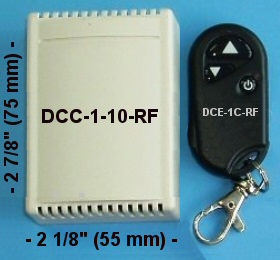
1. Preparing the controller:
Please note that these controllers are shipped with the RF remote pre-programmed for operation with the controller. You do not have to do any setup if you are going to use it as a stand-alone controller.
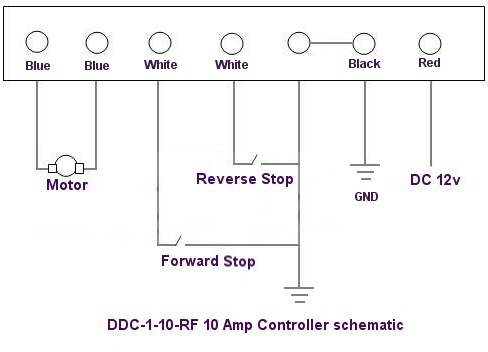
Figure 1: DDC-1-10-RF Controller Schematic
The first step is to remove the controller housing back cover. When you turn it over and .
The above schematic shows the layout of the pigtail wiring harness terminals, as seen looking from above the board.
2. Programming the 'Learn' function:
- Press the button on the main board, this will cause the controller to enter the 'learn' mode (LED starts flashing)
- Press the remote control FORWARD button until flashing stops - the FORWARD function is successfully programmed.
- Press the learning button on the main board again (LED starts flashing)
- Press the remote control STOP button until the flashing stops - the STOP function is successfully programmed.
- Press the learning button on the main board again (LED starts flashing)
- Press the remote control REVERSE button until the flashing stops - the REVERSE function is successfully programmed.
PLEASE NOTE: The learning sequence must be: FORWARD-STOP-REVERSE or REVERSE-STOP-FORWARD
Do not omit the 'STOP' by doing this: FORWARD-REVERSE or REVERSE-FORWARD
3. Specifications & Use:
This 10 amp controller has the special ability to 'learn' RF remote control codes, allowing it to be used in a 'one-remote-to-many-controllers' system, or vice versa in a 'one-controller-to-many-remotes' configuration.
The RF radio remote has the ability to reach through walls and will work from any location in a typical household. It is a full reversing controller, with forward-reverse-stop latching capability.
Specifications:
- Working Voltage: DC6V /12v
- Max Load Current: 10 Amp
- Quiescent Current : 3-5mA
- Rated power : 60W
- Receiving frequency: 315-433.92MHz
- Receiving sensitivity : -95Db m
This remote is suitable for use with our RollerTrol™ tubular motors that enable you to make any size of custom panel, screen or window covering. We supply the tubular motor (works with this remote control), and mounting brackets - you supply the custom 1.5" ID roller tube (readily available anywhere tubing is sold) and roller material.
- This controller works with our RollerTrol™ tubular motors or any 12v DC brushed motor
We sincerely hope you enjoy using these advanced controllers; if you have any questions, please feel free to contact us at any time!